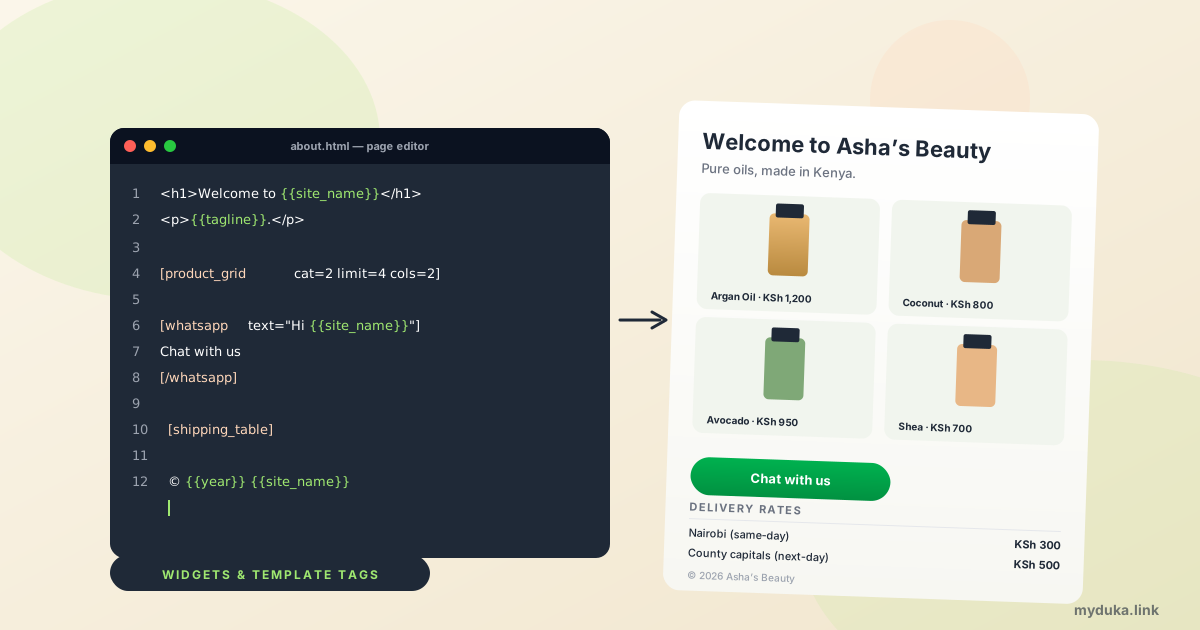
If you've ever opened your About page to update your phone number, then opened your Contact page to update the same phone number, then your footer, then a blog post that mentioned it, you already know the problem we're trying to solve. Your shop has more text-shaped surfaces than you have time to keep in sync. Until now, that meant hand-editing the same phrase across five places every time something changed.
Today we're shipping 20 widgets and 10 template tags — small text snippets you paste once and have your shop turn into something useful at render time. A product card. A WhatsApp button with a prefilled message. Your phone number, kept correct everywhere automatically. Below, the practical tour of what's new and what to do with it.
The two ideas in 30 seconds
Widgets live in square brackets. They render as a styled block: a product, a button, a form, a video. Twenty of them ship with every shop. Examples:
[product id=12]
[contact_info]
[whatsapp]Chat with us[/whatsapp]
Template tags live in double curly braces. They become the matching value from your shop record — your name, email, WhatsApp number, the current year. Ten of them, all of them inline:
{{site_name}} {{site_email}} {{site_phone}} {{site_whatsapp}} {{year}}You can put them anywhere you write rich text in your dashboard: custom pages, blog posts, product descriptions, category descriptions, the homepage, even announcement bars.
Why this matters for a small Kenyan shop
Most Kenyan online shops live in two places: WhatsApp and a real shop URL. The shop URL is where you direct paid traffic, organic search, and customers who want to "see everything." The trouble is, that shop URL grows over time. You add an About page. A blog. A returns policy. A delivery info page. Each one repeats your phone number, your shop name, your delivery promise. Six months later, you change your delivery courier and discover you have to update seven pages. You miss two. Customers see contradictory information. Trust drops.
Widgets and template tags fix that. Set your phone number once, in Settings. Every page that uses {{site_phone}} updates automatically. Set your shipping zones once. Every page with [shipping_table] shows the live rates without you editing anything. Less drift, fewer mistakes, more time selling.
Five things you can build today, in 5 minutes each
1. A real Contact page
Customers ask for your number, your WhatsApp, and your map at least three times a week. Stop replying with the same message. Build it once:
<h1>Contact us</h1>

[contact_info show="name,whatsapp,email,phone"]

[whatsapp text="Hi {{site_name}}, I have a question"]Chat on WhatsApp[/whatsapp]

[contact title="Or send a message" fields="name,email,message"]

[map height=280]
Five widgets, one template tag, every channel covered. The phone number, WhatsApp number, and map all stay current automatically.
2. A delivery page that's never out of date
Most sellers type their delivery rates into a "Delivery info" page and forget. Then they raise rates and the page lies for two months. Use the live shipping table:
<h1>Delivery and shipping</h1>
<p>We ship countrywide. Same-day in Nairobi if you order before 2pm.</p>

[shipping_table]

[callout style=tip title="Tip"]
Free delivery for orders over KSh 5,000 in Nairobi.
[/callout]

[whatsapp text="Quick question about delivery"]Chat with us[/whatsapp]
The table reflects your real shipping zones. Add a new county, the page updates. Change a price, the page updates. You never edit the page again.
3. A homepage section that sells what's hot
Replace "Our products: ..." paragraphs with a real, tappable grid:
<h2>What's new this week</h2>

[product_grid title="" cat=2 limit=4 cols=2 sort=newest]

[spacer size=md]

[cta heading="Sale ends Sunday" subheading="Free delivery on orders over KSh 5,000" button="Shop everything" href="/" style=primary]
Add a new product to the right category, it appears here automatically. Run out of one, mark it as sold out in the dashboard, the grid badge updates. Run a sale, change the CTA copy, you're done.
4. An About page with a customer quote and your story
<h1>About {{site_name}}</h1>

<p>{{tagline}}.</p>

<p>We started in 2024 in Eastlands and now ship countrywide.</p>

[quote author="Wanjiku" role="Repeat customer since 2024"]
The argan oil arrived in two days, packaging was beautiful, and the price was honest.
[/quote]

[divider]

[product_grid title="Our best sellers" cat=1 limit=4 cols=2 sort=default]

[cta heading="Ready to shop?" button="Browse everything" href="/"]
Your shop name and tagline come from Settings. The rest is the actual story plus a real quote and a tappable grid of best sellers.
5. An FAQ page that pulls its own answers from your data
<h1>FAQ</h1>

[faq]
Q: How long does delivery take?
A: Same-day in Nairobi if you order before 2pm, next-day for other counties via Wells Fargo or G4S.

Q: Do you accept returns?
A: Yes, within 7 days of delivery in original packaging.

Q: What payment methods?
A: M-Pesa STK Push, cash on delivery in Nairobi, and Pesapal for cards.
[/faq]

<h2>Delivery rates</h2>
[shipping_table compact=1]

[whatsapp text="Hi {{site_name}}, I have a question"]Still need help?[/whatsapp]
The accordion makes it scannable on mobile. The shipping table is live. The WhatsApp button works on every customer's phone. Five minutes of work, replaces what took half an hour to maintain.
The full widget catalogue
Twenty widgets, grouped by what they do:
| Group | Widgets |
|---|---|
| Products | [product], [product_grid], [product_slider], [price], [stock], [category] |
| Layout | [button], [cta], [divider], [spacer] |
| Contact | [contact], [contact_info], [whatsapp], [social], [map] |
| Content | [callout], [faq], [quote], [video], [shipping_table] |
Each one has a help article with examples and every attribute documented:
- Showing products with widgets
- Buttons, banners, and layout widgets
- Contact, WhatsApp, and social widgets
- Rich content widgets
- Template tags reference
- Overview: how it all works
You don't need to memorise any of this
Inside every rich-text editor in your dashboard, two pickers do the work for you:
- + Insert widget opens a list of every widget, with the fields they need. Fill in the fields, the editor pastes the syntax for you.
- + Insert tag opens the list of template tags with a preview of what each one will become for your specific shop.
Use the picker for a few weeks. The widgets you reach for often you'll start typing from memory. The rest stays one click away.
One small habit that compounds
Every time you find yourself typing your shop name, phone number, email, or shipping rates into a page, stop and use the tag or widget instead. After three months, you'll never want to go back. Your About page won't say "© 2024" in February 2026. Your Contact page won't have last year's phone number. Your shipping rates won't contradict your checkout. The shop runs itself a little more, and you get to focus on what only you can do: picking products, photographing them, and hustling for orders.
Open your shop dashboard, pick one page, replace one hand-typed value with a template tag. That's the first step. Five minutes, now, and your shop just got a little smarter.