Your photos do most of the selling on a Kenyan online shop. Before a customer reads a price, before they reach the description, before they decide whether to DM you, they look at the picture. If the photo says "this is real, this is good, this is mine" they keep scrolling toward the buy button. If it says "this is a stock photo or a tired phone snap in low light" they're gone in three seconds.
The good news: you don't need a camera, a lightbox, or a photographer. The phone in your pocket and a window in your house cover 90% of what a professional setup would do. This is how to use them. If you also want the wider playbook, our complete guide to starting an online business in Kenya covers every other part of running the shop.
Why your photos matter more than your prices
You can't out-discount Jumia. You can out-photo them. Most Jumia category pages are full of grey product shots on white backgrounds, dropped in by suppliers in Guangzhou. A small Kenyan shop with three honest, well-lit photos — the product on a wooden table, in a customer's hand, packed in a branded mailer — converts at 2 to 3 times the rate of a Jumia listing for the same product. Photography is the cheapest, most copy-able advantage you have.
You don't need every product shot to be art. You need them to be:
- Sharp — in focus, no shake.
- Bright — the product is clearly visible without straining.
- Honest — the colour and size match what arrives.
- Consistent — all your photos look like they belong to the same shop.
Hit those four and you're already ahead of 80% of Kenyan online sellers.
Equipment you actually need (you already have it)
The honest minimum kit:
- A smartphone with a working back camera. Any phone made in the last four years takes photos good enough to sell on. iPhone 11+, mid-range Samsung, Tecno Camon, Infinix Note — they all work. The newer the better, but a 2020 phone is fine.
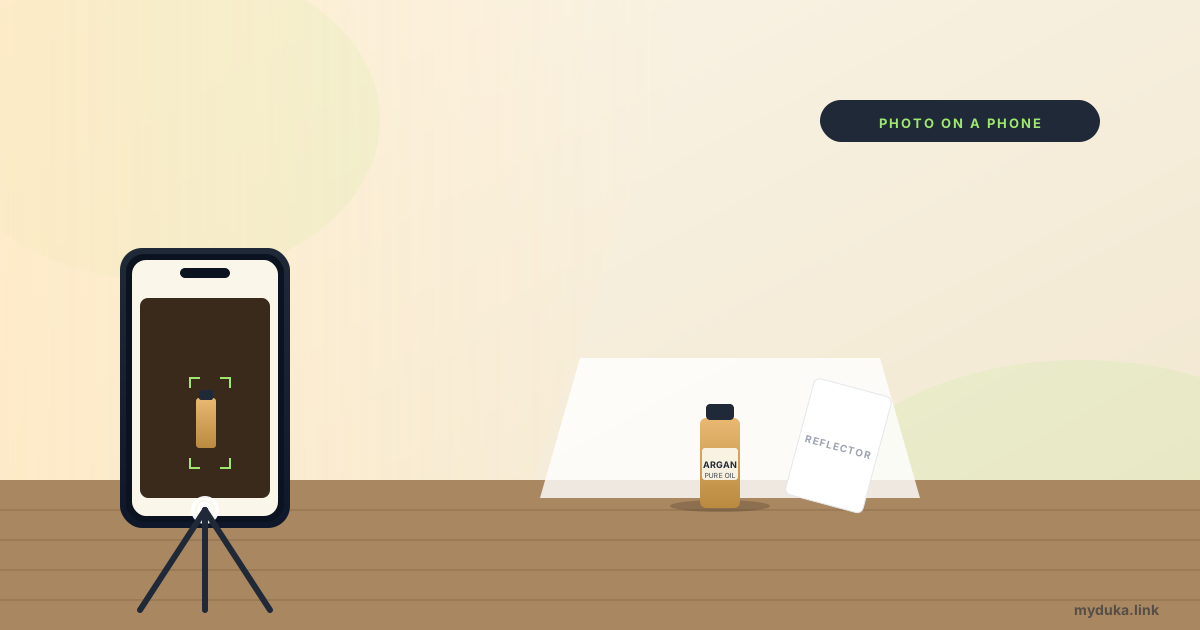
- A clean window during the day. Free, in your house, by far the best light source you'll ever own.
- A piece of clean white card or fabric, A3 size or bigger. KSh 50 from a stationer.
- A small piece of cardboard wrapped in white paper or aluminium foil. KSh 0. This is your reflector.
That's the kit. KSh 50 to KSh 150 total. Spend more later if you want, but don't pretend you need a KSh 8,000 lightbox before you can start.
Light is the magic, and it's free for two windows a day
Window light, indirectly, is the single highest-quality light you can shoot a product in. The two windows of the day:
- Morning, 8am to 11am. Soft, blue-tinted, gentle shadows. Best for skincare, beauty oils, fabrics, anything where colour accuracy matters.
- Afternoon, 3pm to 5pm. Warm, golden, slightly stronger shadows. Best for food, leather, wooden products, anything that benefits from warmth.
Avoid direct midday sun (12pm to 2pm) — it's harsh and creates ugly shadows. Avoid evening artificial light entirely — it casts a yellow tone your customers can't unsee.
The setup, in 60 seconds:
- Place your product on a small table 1 to 2 metres from a window. The window should be on one side of the product, not behind or in front.
- Lay your white card flat on the table as a backdrop. Curve it gently up the wall behind so there's no visible seam.
- Hold your reflector (the foil-wrapped cardboard) on the side of the product opposite the window. It bounces light back to fill the shadow.
- Tap to focus on the product. Tap again, drag your finger down to slightly underexpose the shot. Bright photos look amateur; slightly darker reads as premium.
- Hold your phone with two hands, breathe out, take three shots in quick succession. The middle one is usually the sharpest.
That's the entire technique. Do this in your kitchen at 9am tomorrow with one product. Compare the result with your last 5 product photos. The difference will be obvious.
Backgrounds: the cheap setups that beat KSh 5,000 lightboxes
Three background options, in order of cost:
Plain white card (KSh 50). The default. Clean, professional, makes the product the only thing in the photo. Use for 80% of your shots. Wrinkles? Iron the card on its back side, low heat, with a thin cloth on top.
Wooden board (KSh 0 if you have a wooden floor or table). Adds warmth and texture. Use for food, leather, beauty, anything that fits a "warm and natural" mood. Photograph from directly above on a clean wooden table.
Real-life context (KSh 0). The product in someone's hand, on a kitchen counter, in a bathroom mirror, being applied. Use for one out of every three product photos. Customers want to see the product in life, not just in a void.
The three setups together — white-card hero shot, wooden lifestyle shot, in-hand context shot — are the formula most successful Instagram-led Kenyan shops use. Three angles, three moods, one product, one shoot.
Composition: three angles that work for everything
Without overcomplicating it, every product can be photographed three ways:
- Top-down (overhead). Camera directly above the product, looking down. Best for: flat-lay arrangements, food, jewellery, makeup spread out, cards, books.
- Eye-level. Camera at the height of the product, level with it. Best for: bottles, packaging, anything with a label or branding you want to read.
- 45-degree. Camera halfway between top-down and eye-level. Best for: showing depth on bowls, plates, food, anything with both a top and a side worth seeing.
Pick one angle as your main shot and stick with it across your shop. Consistency is what makes a shop look "designed" rather than thrown together. Variety is for the second and third photos on each product page, not the hero.
Editing: free apps that do the work
You don't need Photoshop. Three free apps cover every edit a small Kenyan shop needs:
- Snapseed (free, Android + iOS). The best free photo editor on a phone. Use the "Selective" tool to brighten just the product without lifting the background. Use "Tune Image" to adjust brightness and saturation in 10 seconds.
- Lightroom Mobile (free tier, Android + iOS). Better colour grading than Snapseed. Save a preset once (your shop's "look") and apply it to every photo for instant consistency.
- Remove.bg (free, web). Drop in any product photo, get a clean white-background version in 5 seconds. Good for marketplace listings or thumbnails where you need a stark cut-out.
Don't over-edit. The most common amateur mistake is bumping saturation 30% so the product looks "vibrant." Customers see the original product on arrival, notice it's duller than the photo, and feel cheated. Keep edits subtle. The goal is to fix bad lighting, not to invent a product that doesn't exist.
Batching: shoot 30 products in two hours
Don't photograph products one at a time, day by day. You'll never finish. Batch:
- Pick a Saturday morning between 8am and 11am.
- Lay all 30 products on the floor, sorted by category.
- Set up your window-side table and white card once.
- Photograph each product in sequence, taking 3 shots per angle. Move on.
- Don't review or edit during the shoot. Just capture.
- Sit down with a coffee at lunch and edit the keepers in Lightroom Mobile, applying your saved preset to all of them.
- Upload to your shop in one batch. Done.
Two hours, once a month, beats 15 minutes scattered across 30 days. The setup is the slow part, not the shooting.
Common mistakes that hurt sales
Photographing under fluorescent lights. Office tubes and Jiko-bulb shots have a green-yellow tint customers see immediately. Always use window light during the day.
Cluttered backgrounds. A KSh 1,500 hand cream sitting next to your TV remote, a half-eaten samosa, and a pair of kids' shoes does not say "premium." Clear the table.
One photo per product. Customers buy with confidence when they see the product from 3 to 5 angles. One photo says "I made this listing in a hurry."
Using the supplier's stock photos. Every other reseller is using the same image. Customers spot it. Yours becomes interchangeable. Always shoot your own, even if just one custom photo per product.
Inconsistent edit styles. One photo is bright and warm, the next is dark and cool, the third is heavily filtered. Use the same Lightroom preset across every photo. Visual consistency reads as professionalism.
No model photos for clothes. Mtumba and fashion sellers especially: a flat-lay clothing shot converts at maybe a quarter of the rate of the same clothing on a friend or model. Recruit a friend, pay them KSh 500, take 20 outfit photos.
Once your photos are sharp, the next leverage point is the words next to them. Our guide to product descriptions that sell covers writing copy that holds attention.
FAQ
Do I need a DSLR camera or an iPhone Pro to sell online in Kenya?
No. Any smartphone made in the last 3 to 4 years takes photos good enough to sell on. The variables that actually matter are light, background, and angle, all of which are free. A KSh 100,000 camera in bad light produces worse photos than a KSh 15,000 phone in a sunlit window.
What's the best background colour for product photos?
Plain white for hero shots, plain wood (light or medium-tone) for lifestyle shots. Avoid colours, patterns, and textures other than wood. Coloured backgrounds compete with your product for attention. Your product should be the only thing on the page that demands the eye.
How many photos should I have per product?
Three at minimum, five for serious purchases (clothing, electronics, large items). One hero shot, one lifestyle shot, one detail shot, optionally one in-use shot, optionally one packaging shot. More than five is rarely necessary and slows the page on mobile.
Can I use AI image generators for product photos?
Don't. AI-generated product images legally count as misleading representation under the Consumer Protection Act 2012, and customers spot them. Always shoot your real product. AI is fine for backgrounds, lifestyle composites, or marketing graphics where the product itself is identifiable as real, but the product photo must be of the actual product.
How do I edit photos to look consistent across my shop?
Save a preset in Lightroom Mobile after editing your first 5 photos to taste. Apply that preset to every subsequent product photo. The same brightness, saturation, and warmth across every product makes your shop feel "designed" rather than "thrown together." A KSh 0 investment that lifts perceived quality immediately.
What size should I upload product photos at?
1080 to 1500 pixels on the long edge is the sweet spot. Larger is wasted on mobile shoppers; smaller looks pixelated. Most modern shop platforms (including MyDuka) automatically resize and compress photos on upload, so don't worry too much. Just don't upload 4MB phone-camera originals if you can help it; they slow your page on shoppers' data.
Your next step
This Saturday, between 9 and 11am, set up your window-side table, prop your white card, and photograph 5 of your best-selling products. Use Lightroom's Auto button, save the preset, apply it to all 5, upload them. Compare your sales for the next two weeks against the prior two. The difference will pay for years of better lighting.