Every Kenyan online seller eventually hits the same wall. Your customers want to pay with M-Pesa. Your shop site needs to receive that payment and confirm the order automatically. Somebody mentions the words "Daraja API" and your eyes glaze over. You start thinking about hiring a developer.
You don't need a developer. You need to understand what Daraja actually is, what credentials it gives you, and where to paste them in your shop platform. This piece walks through that, in the order it actually happens, for a non-technical seller in 2026. If you're earlier in the journey, our complete guide to starting an online business in Kenya covers the rest of the picture.
What Daraja actually is, in plain English
Safaricom built M-Pesa as a closed system. Originally, only Safaricom-approved partners could plug into it. In 2017, Safaricom opened a developer portal called Daraja ("bridge" in Swahili) that lets any business apply for credentials and connect their software to M-Pesa.
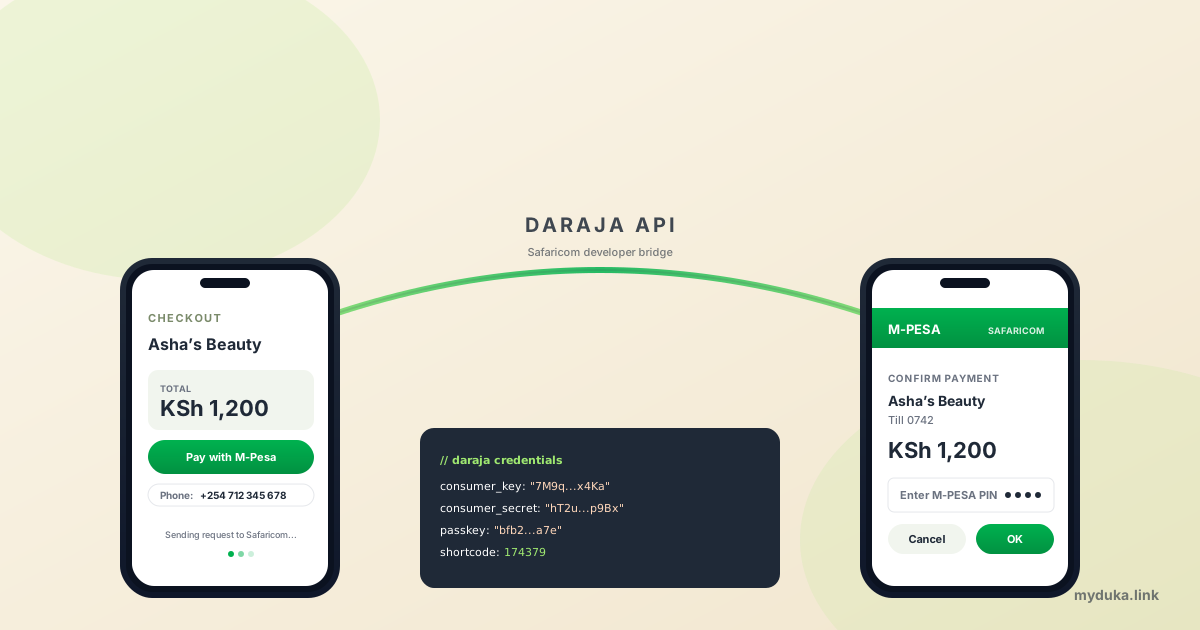
For an online shop, the one feature you care about is STK Push (also called Lipa na M-Pesa Online). When a customer clicks "Pay with M-Pesa" on your shop, your shop calls Safaricom's servers. Safaricom sends a prompt to the customer's phone. The customer enters their M-Pesa PIN. Money lands in your Till. Your shop receives a confirmation message back from Safaricom and marks the order as paid. The whole loop takes under 30 seconds.
Daraja gives you four pieces of identity that make this work:
- Consumer Key — a public-ish identifier for your app.
- Consumer Secret — the password that pairs with the key. Treat it like a password.
- Passkey (Lipa na M-Pesa Online Passkey) — used to sign each STK Push request.
- Shortcode — your Buy Goods Till number or Paybill number.
Your shop platform asks you for those four values once. After that, M-Pesa works on your shop forever, until you regenerate the keys.
Sandbox vs production — start with sandbox
Daraja has two environments. Sandbox is the test playground; you can sign up in 5 minutes, get sandbox credentials immediately, and run fake transactions to make sure your shop wires up correctly. No real money moves. Sandbox uses Safaricom test phone numbers (e.g., 254708374149).
Production is real M-Pesa with real customers. You can't go straight to production; Safaricom requires you to apply, verify your business and Till, sign an agreement, and wait for approval. The application takes 1 to 3 weeks depending on how complete your paperwork is.
The right sequence: sign up on sandbox, plug the sandbox credentials into your shop, push a test transaction, see "Pay KSh 1 to your Till" land on the test phone simulator, confirm your shop receives the callback, then apply for production. Don't apply for production before you've tested in sandbox; if your callbacks are misconfigured, you'll have customer money stuck in the void.
Get sandbox credentials in 5 minutes
- Go to developer.safaricom.co.ke and create an account with your email.
- Click "Create new app." Give it a name like "MyDuka Shop."
- Tick the M-Pesa products you want to enable. For STK Push, tick "Lipa Na M-Pesa Online" and "M-Pesa Sandbox."
- Click create. The portal shows you a Consumer Key and Consumer Secret. Copy both somewhere safe.
- For the Passkey, the sandbox passkey is a fixed test value Safaricom publishes in their docs. The sandbox shortcode is also fixed (174379 for STK Push tests).
Paste those four values into your shop platform's M-Pesa settings page. On MyDuka, that's Dashboard → Settings → Payments → M-Pesa → Direct Daraja, and there are four input fields exactly matching those names. Set the mode to "sandbox," save, and run a test order.
Apply for production credentials
Once sandbox works, apply for production. This is where most sellers stall, not because it's hard, but because they don't have the right paperwork ready. Have these on hand before you start:
- Your KRA PIN certificate (PDF).
- Your BRS Certificate of Registration (PDF).
- The phone number registered as the M-Pesa Business owner / supervisor for your Till.
- Your Till number (Buy Goods) or Paybill number.
- The official email associated with the Till (Safaricom sent it to you when you opened the Till).
- A short description of how you'll use M-Pesa: e.g., "STK Push payments on online shop checkout."
On the developer portal, click "Go Live" on your sandbox app. The form asks for the documents above plus your shortcode. Submit. Safaricom replies in 1 to 3 weeks with production credentials. The Consumer Key and Secret will be different from sandbox; the Passkey is unique to your Paybill/Till. You'll receive an email with these values, plus an SMS to the registered Till supervisor with a one-time PIN that activates production.
Switch your shop platform's M-Pesa mode from "sandbox" to "production," paste the production Consumer Key, Consumer Secret, Passkey, and your real Till number. Save. Run a real KSh 1 transaction with your own phone. Confirm money landed in your Till. You're live.
Callback URLs — the bit that trips everyone
STK Push works in two halves. Your shop sends a request to Safaricom; Safaricom sends a callback to your shop a few seconds later confirming success or failure. That callback URL is the address Safaricom POSTs to.
The two rules that keep callback URLs working:
- HTTPS only. Safaricom rejects HTTP callback URLs in production. Your shop must be on a domain with a real SSL certificate. If you're using a managed platform, this is automatic. If you're on a custom server, install Let's Encrypt before applying.
- The URL must be publicly reachable. Safaricom's servers must be able to POST to it from outside. Local URLs, IP-only URLs, and URLs behind authentication will fail silently.
On managed platforms like MyDuka, the callback URL is auto-generated and registered when you save your Daraja credentials. You don't paste it anywhere. On a custom build, you'll typically expose /api/mpesa/callback on your domain and pass that URL to Daraja in each STK Push request.
If Daraja paperwork is too much: PayHero
PayHero sits between you and Daraja. You sign up with PayHero, link your existing Till, and they handle the production Daraja relationship for you. You give your shop platform a PayHero username, password, and channel ID instead of Daraja credentials. Settlement still goes to your Till; PayHero just bridges the API call.
The tradeoff: PayHero takes a small fee per transaction on top of M-Pesa's standard collection fee. Most sellers find that fee tolerable for the saved weeks of paperwork. Many start on PayHero and migrate to direct Daraja once their volume justifies the in-house onboarding effort.
MyDuka and most modern Kenyan shop platforms support both Direct Daraja and PayHero as separate payment options in the dashboard. You pick one. We covered the broader payment options in the pillar guide.
Common Daraja errors and what they actually mean
"Invalid Access Token" — your Consumer Key or Secret is wrong, or you're using sandbox credentials in production mode. Re-paste both, double-check no trailing space.
"The transaction is being processed by another instance" — usually a duplicate request fired in quick succession. Wait 60 seconds and try again.
"Request cancelled by user" — the customer dismissed the prompt or didn't enter their PIN in time. Show a friendly retry button.
"Invalid Phone Number" — the format Safaricom expects is 2547XXXXXXXX (no leading +, no leading 0). Most platforms normalise this for you, but if you're hand-rolling it, watch the format.
STK Push fires but no callback arrives — your callback URL is wrong, not HTTPS, or unreachable. Check your platform's callback log. On a custom build, check your server logs.
FAQ
How much does Daraja itself cost?
Daraja is free to sign up and free to use. You don't pay Safaricom for API calls. You pay the standard M-Pesa transaction fee per collection (Buy Goods Tills have their own seller-side fee schedule that Safaricom publishes). There is no monthly subscription.
Can I use Daraja with a Paybill instead of a Till?
Yes. STK Push works with both Buy Goods Tills and Paybill numbers. A Paybill is more flexible (you can collect rent, school fees, donations) but Buy Goods is what most online retailers use because it's free for the customer.
How long does Safaricom take to approve production access?
Typically 1 to 3 weeks once your paperwork is complete. Incomplete applications loop back and add another week. The fastest approvals come from applicants who submit a clean BRS certificate, a matching KRA PIN, and a Till that's already active.
Can I use one Daraja app for multiple shops?
Technically yes, but it's not advisable. Each shop should have its own Daraja credentials so that revoking one doesn't disrupt the others. Create a separate app per shop on the developer portal.
What if my STK Push works in sandbox but fails in production?
Almost always one of three things: you're still using sandbox credentials, your callback URL isn't HTTPS, or your Till isn't actually activated for online collection (Safaricom sometimes registers the Till but not the online product). Call Safaricom Business at 0722 002 100 and ask them to confirm "Lipa na M-Pesa Online" is enabled for your shortcode.
Do I have to handle reversals myself?
Reversals (refunds) require a separate Daraja product called "Reversal" that requires extra approval. Most small shops don't enable it; they handle refunds manually by sending the customer money via M-Pesa Send Money, and they book it as an expense. Enable Reversal API only if you process more than ~50 refunds a month.
Your next step
Sign up on the Safaricom developer portal right now and create a sandbox app. Plug those credentials into your shop platform and push a test KSh 1 transaction. Once that works, kick off the production application with your BRS certificate and Till details. If you'd rather skip the paperwork for now, MyDuka also supports PayHero as a one-click alternative inside the same payment settings page.