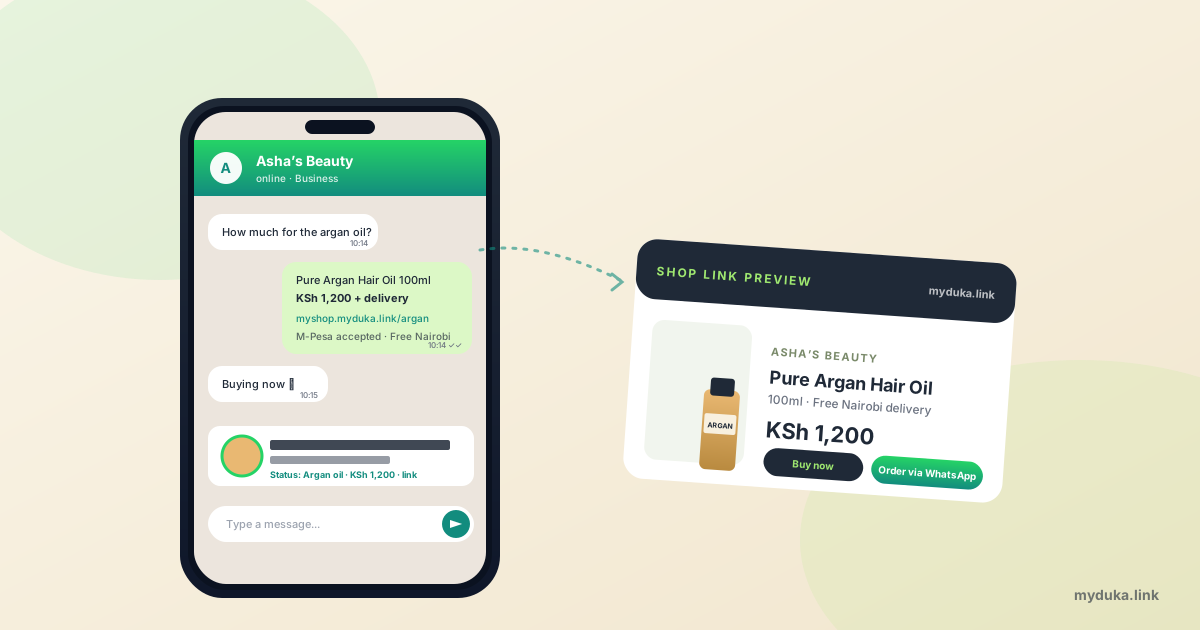
You've been selling on WhatsApp for a while. The status posts get views. Customers ask for prices, you reply with a price list, sometimes they buy. It works, but only just. You're answering the same five questions every day, you can't take payment automatically, and you have no idea which post drove which order. The growth ceiling is real and you're starting to hit it.
The fix isn't to abandon WhatsApp for a "real website." It's to add a real shop link to what you're already doing on WhatsApp. The two channels work better together than either does alone. This piece walks through how to set that up. If you also need the wider picture, our complete guide to starting an online business in Kenya covers payments, shipping, and the rest.
Why WhatsApp alone hits a ceiling
WhatsApp is unbeatable for casual selling. It's where your customers already live, your status posts reach hundreds of viewers in hours, and DMs feel personal. But it has structural limits that show up the moment you try to grow:
- No automatic payment. You manually request payment, manually confirm it, manually mark the order paid. At 5 orders a day, that's tolerable. At 30, you'll forget.
- No catalog history. A customer who saw your beauty oil three weeks ago can't easily find it again. They have to ask.
- No Google traffic. WhatsApp doesn't show up in Google searches. The status updates die in 24 hours.
- No analytics. You don't know which post or which photo drove which order.
- No customer database. You can search a chat history, but you can't filter "all customers who bought argan oil in March" without a spreadsheet you maintain by hand.
The hybrid model fixes these without making you change channels. WhatsApp stays as your customer-facing front. A shop link on a real platform handles the catalog, the checkout, and the database.
Step 1: Set up WhatsApp Business properly
If you're still using regular WhatsApp for selling, switch to WhatsApp Business. It's free, runs on the same phone number, and adds three things that matter:
- Business profile with your shop name, hours, address, and most importantly, a website link. This is where your shop URL goes.
- Catalog with up to 500 products, each with a photo, name, price, and description. Customers tap through it inside the chat without leaving WhatsApp.
- Quick replies and away messages, so common questions get answered instantly. Set up a quick reply for "How much?" that sends a link to your shop.
Download WhatsApp Business from the Play Store. Migrate your existing WhatsApp number to it (the app walks you through it; don't lose your chats). Go through the business profile setup carefully. Add your shop name, opening hours, business category, and a one-line description.
The single most valuable field is the website link in your profile. Paste your shop URL there. Every customer who taps your business profile sees a clickable shop link. This is free traffic you'd otherwise lose.
Step 2: Add a real shop link
You need a URL that works as a shoppable destination. Three options, ranked by effort:
WhatsApp catalog only. Lowest effort. Customers browse the catalog inside WhatsApp and DM you to order. Same manual workflow as before, but at least the catalog is now tidy and shareable.
WhatsApp catalog + shop platform. The hybrid. You list products on a platform like MyDuka (free for up to 10 products, KSh 1,000 a month for unlimited), and the shop URL becomes your "website link" in WhatsApp Business. Customers can either DM you or buy directly through the shop with M-Pesa STK Push. We covered the platform options in detail in the Shopify alternative for Kenyan sellers piece.
Custom website. Highest effort. Only worth it if you have unusual workflows.
Most sellers should pick option two. The shop platform handles the catalog, payments, and orders database. WhatsApp stays as the customer-facing layer. You get the best of both.
Step 3: Place the link where customers actually see it
Adding the shop URL to your WhatsApp Business profile is necessary but not enough. Most customers never tap a profile. Place the link in five places:
- WhatsApp Business profile. The official spot. Set it once.
- Status updates. Every status post should include the link as text. WhatsApp makes status text tappable. "Pure argan oil — KSh 1,200 — order: myshop.myduka.link/argan."
- Quick reply for "How much?" Auto-respond with the price and the shop link. Saves you 50 messages a day.
- Catalog product descriptions. Each product description should end with "Order at myshop.myduka.link" so customers who browsed the catalog can buy without DMing.
- Your bio in other apps. Instagram, TikTok, Facebook all let you put one link in your bio. Use the shop URL, not the WhatsApp number, so traffic from those apps lands on a buyable page.
Step 4: A daily WhatsApp status routine that drives orders
WhatsApp status is the single highest-converting channel for most Kenyan small shops. Real seller data suggests it drives 40 to 60% of repeat orders for shops doing under KSh 200,000 a month. The mistake new sellers make is posting once and going quiet. The version that works:
5 to 8 status updates a day, spread through the day. Don't dump them all at 9am. Post one mid-morning, one at lunch, one mid-afternoon, two in the evening (peak status viewing time is 7 to 10pm).
Mix four types of content:
- Product photos with price and link. Most posts.
- Customer screenshots. "Asha received her order, says it works perfectly" with the customer's photo (with permission).
- Behind-the-scenes. You at Gikomba picking stock, you packing parcels, you photographing products.
- Daily availability recap. One status post each morning summarising what's in stock today.
Always include the price. Never "inbox for price." A status with no price is a status that earns nothing. The conversion rate on priced status posts is roughly 40% higher than unpriced ones based on the data sellers I've worked with track.
Step 5: The "Order via WhatsApp" button
On a real shop platform, every product page should include an "Order via WhatsApp" button next to the regular "Buy now" button. When tapped, it opens a WhatsApp chat to your number with a pre-filled message like "Hi, I'd like to order Pure Argan Oil (KSh 1,200)." The customer just hits send.
This works for the customers who don't trust online checkout yet. They want a human conversation before paying. The button captures them while still capturing their intent and the product they wanted, all in one tap.
MyDuka enables this button automatically when you add a WhatsApp number to your shop settings. Other platforms (Shopify with the right app, custom builds) can wire it up too. If you only do one new thing this week, add this button.
A typical conversion pattern
For most Kenyan shops doing KSh 50K to 300K a month, the order flow ends up roughly:
- Customer sees a status post with a product, price, and link.
- About 20% tap the link, browse the shop, and check other products.
- Of those, around half convert directly through M-Pesa STK Push at the shop checkout.
- The other half DM you with a question (sizing, availability, delivery time). About 60 to 70% of those DMs convert into paid orders if you reply within an hour.
- The remaining 80% of status viewers don't take action today, but a sliver of them remember you when they next need the product. Status compounds over weeks, not hours.
None of this happens if you post once and disappear. Daily posting is the floor. The shops that win post every day for years.
FAQ
Do I need a separate phone number for WhatsApp Business?
No. You can convert your existing WhatsApp number to WhatsApp Business without losing your chats or contacts. The migration is built into the WhatsApp Business app. If you want a separate business number for boundary reasons, that's a personal choice, not a technical requirement.
Can WhatsApp Business take M-Pesa payments directly?
Not natively. WhatsApp's "Payments" feature isn't live in Kenya yet. You either ask the customer to pay your Till manually (and confirm via M-Pesa SMS), or you send them a shop link where M-Pesa STK Push fires automatically. The shop-link approach is faster for everyone.
How many products should I put in my WhatsApp catalog?
WhatsApp allows up to 500. In practice, more than 30 to 40 products in the catalog becomes hard for customers to scroll. Keep your top sellers in the WhatsApp catalog and link to your full shop for the long tail.
Can I use the WhatsApp Business API for automation?
Yes, but the API is meant for businesses doing thousands of conversations a month and requires a Business Solution Provider. Below 1,000 conversations a month, the regular WhatsApp Business app is the right tool. Don't over-engineer.
Does WhatsApp ban accounts that send too many messages?
Yes. Sending unsolicited bulk messages to people who haven't messaged you first can get your number banned. Use status (which is opt-in) and broadcast lists (which only deliver to your existing contacts) instead of mass DMs. Don't import contacts you scraped from somewhere.
What's the right way to handle "How much?" messages?
Set up a Quick Reply in WhatsApp Business that responds with a price list and your shop link. Customers get the answer instantly, you save 50 messages a day, and the link captures the ones who want to buy without further chat.
Your next step
Three things, in order. Switch to WhatsApp Business if you haven't. Add your shop link to your business profile. Set up one Quick Reply for "How much?" that includes the link. Tomorrow morning, post 6 status updates with prices and the link. By Friday you'll know if the hybrid works for you. Set up a free shop on MyDuka if you don't have one yet, and read the pillar guide for the rest of the setup.