Most Kenyan online shops do customer service on WhatsApp. It's how shoppers prefer to ask, and it's how sellers prefer to answer. The trouble starts the moment your shop crosses 5 to 10 orders a day. Suddenly you're answering "How much?" 40 times before lunch, hunting through old chats for a customer's address, and replying to a complaint at 11pm because you didn't see it earlier.
This guide walks through how to do WhatsApp customer service properly — quick replies that save you 50 messages a day, broadcast lists that don't get you banned, the 3-message script for handling complaints, and how to set hours without losing customers. If you're earlier in the build, our companion piece on WhatsApp Business + a shop link covers the basic setup.
Switch to WhatsApp Business if you haven't
Regular WhatsApp wasn't designed for businesses. WhatsApp Business is, and it's free. The features that matter for customer service:
- Quick replies — pre-written answers triggered by typing
/keyword. - Away messages — auto-replies during your "closed" hours.
- Greeting messages — auto-sent on the first message from any new contact.
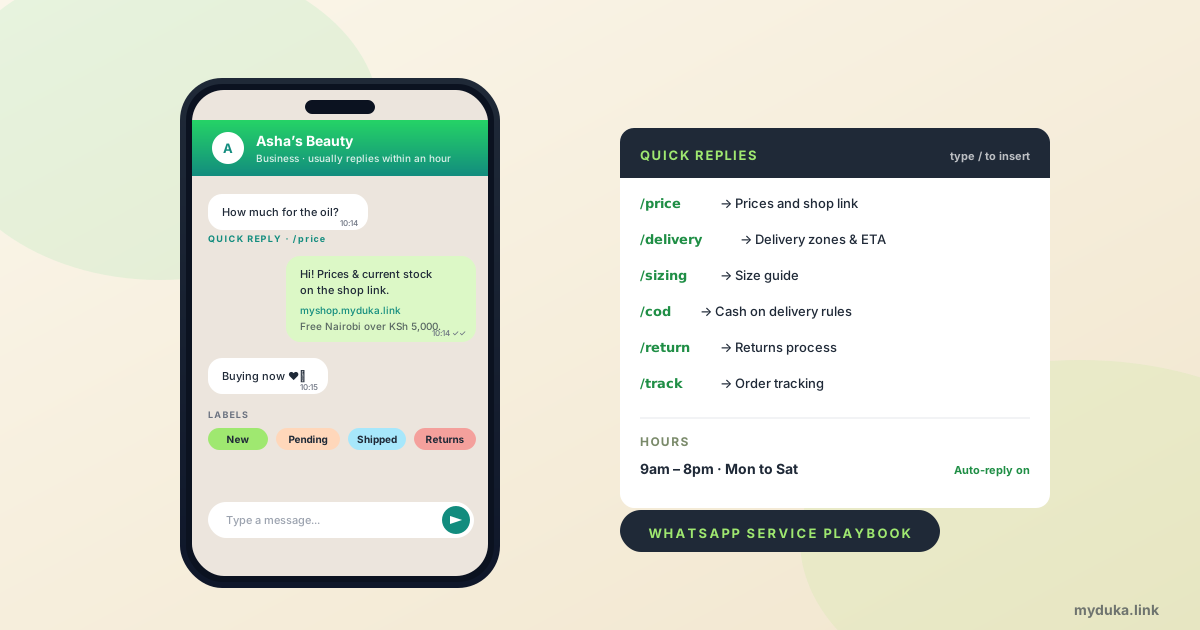
- Labels — colour-coded tags on chats (New customer, Pending payment, Shipped, Returns).
- Catalog — a built-in product browser inside the chat.
- Statistics — basic message counts and delivery rates.
If you're still on regular WhatsApp, migrate today. The Business app keeps your same number, your chats, and your contacts. Takes 10 minutes.
Set hours and respect them
The single most important customer-service decision a small Kenyan shop makes is when to be off. Without hours, you're on call 24/7, customers expect replies at 11pm, and burnout kills the shop within 18 months.
Reasonable shop hours: 9am to 8pm, Monday to Saturday. Closed Sunday. Set them in WhatsApp Business → Settings → Business tools → Away message.
The away message that works:
"Hi! Thanks for the message. We're currently closed (open 9am–8pm Mon–Sat). We'll reply first thing in the morning. For urgent orders, our shop is open 24/7 at [your shop URL]."
Three things this away message does well: confirms hours, sets a reply expectation, and routes urgent customers to self-serve at the shop link. The customer doesn't feel ignored, they feel handled.
The honest truth: you'll break your own hours sometimes. That's fine. The point is the customer's expectation is set. Replying at 9pm when your stated hours end at 8pm reads as a bonus. Replying at 1am every day reads as desperate.
Quick replies: the 50-messages-a-day saver
Set up these quick replies on day one. Each one saves you typing the same answer 20+ times a week.
/price — for "How much?"
"Hi! Our prices and current stock are on the shop link: [your shop URL]. Free Nairobi delivery on orders over KSh 5,000. Let me know if you have questions on a specific product!"
/delivery — for "How does delivery work?"
"Delivery: same-day in Nairobi if you order before 2pm (KSh 300). Other counties: next-day via Wells Fargo or G4S, KSh 500. Pay via M-Pesa STK Push at checkout. Returns within 7 days for any defects."
/sizing — for "What size will fit me?" (clothing/footwear)
"Our sizes run true to UK sizing. Send me your usual UK or KE size and I'll confirm we have it. Or if you prefer, send a measurement of your bust/waist and I'll match."
/cod — for "Can I pay on delivery?"
"Yes, COD is available within Nairobi for orders under KSh 3,000, with a non-refundable KSh 200 commitment fee at order placement. Larger orders are M-Pesa or Pesapal at checkout."
/return — for "I want to return something"
"Sorry to hear that! 7-day returns accepted in original packaging. Send the item via the same courier you received it, with the order number on the parcel. Refund issued within 48 hours of arrival, after the item's checked."
/track — for "Where's my order?"
"Send me your order number and I'll check the courier status for you. (If you're in Nairobi same-day, the rider will call 30 minutes before arrival.)"
Set these up in WhatsApp Business → Settings → Business tools → Quick replies. Type /price in any chat, the full message appears. Edit slightly for the specific customer if needed. Save 5 minutes per reply, repeat 20 times a day.
Greeting messages: the first-message handler
Every new contact who messages your shop gets an auto-greeting. Use it to set expectations and route the obvious questions:
"Hi 👋 Asante for reaching out to Asha's Beauty. We reply within 1–2 hours during shop hours (9am–8pm Mon–Sat). For prices and current stock, browse the shop: [link]. Need help with a specific product? Just reply with the product name."
This greeting handles 60% of new contacts without you needing to reply at all — they tap the shop link and self-serve. The remaining 40% who genuinely need help arrive with a specific question, not a vague "hi."
Broadcast lists vs status: when to use which
Two channels for one-to-many WhatsApp marketing, with very different rules.
Status is opt-in. Anyone who has your number can choose to view it; you can't force them. Use status for everything public — new arrivals, daily availability, behind-the-scenes, customer screenshots, sale announcements. Post 5 to 8 status updates per day, spread through 9am to 9pm. (More on this in our WhatsApp Business piece.)
Broadcast lists are private. Messages you send go individually to up to 256 recipients at once. They look like a normal DM to the receiver. The rule WhatsApp enforces: only people who have your number saved in their contacts will receive your broadcast. If a recipient doesn't have you saved, the message doesn't deliver and counts against your account's spam score.
Use broadcast lists sparingly:
- Existing customers only. Never put numbers you scraped from Instagram or imported from a contact list. Only customers who've ordered from you and have your number saved.
- Maximum once a week. More than once a week feels like spam and triggers blocks.
- One specific announcement per broadcast. "Sale starts tomorrow" or "New stock just arrived." Not generic check-ins.
- Always include opt-out. "Reply STOP if you'd rather not get these updates." Customers who reply STOP go on a separate list and get no future broadcasts.
Broadcast wrong and your account gets banned. Broadcast right (existing customers, weekly maximum, with a specific offer) and you get a 5–15% conversion to repeat purchases on each send. Easily the highest-ROI channel a Kenyan small shop has.
Handling complaints: the 3-message script
Most customer service damage on WhatsApp comes from rushed, defensive replies to complaints. The 3-message script slows you down and gets better outcomes.
Message 1 — acknowledge. Within an hour of receiving the complaint:
"Hi [name], so sorry to hear that. Let me look into this and I'll get back to you within an hour with a clear answer. Could you send me a photo of what you received and the order number?"
Notice what this message doesn't do: it doesn't argue, doesn't excuse, doesn't promise an outcome. It buys you time and gets you the info you need.
Message 2 — investigate and decide. Within the hour you committed to:
"Hi [name], I've checked your order. [What you found.] Here's what I can do: [specific resolution]. Is that okay with you?"
Specific resolution beats vague promises. "I'll send a replacement, dispatched today by Sendy, no charge to you" beats "We'll sort it out." The customer wants certainty.
Message 3 — follow through. Within 24 hours of the resolution:
"Hi [name], the replacement was dispatched at 11am today via Sendy, tracking number [X]. Should arrive by tomorrow evening. Apologies again — and thanks for being patient."
Closing the loop in writing converts a problem customer into a loyal one. Skipping it leaves them wondering and tweeting.
For the underlying legal framework on returns and refunds, our returns and disputes guide covers what you must, can, and shouldn't do.
Response time targets
The Kenyan customer's mental clock for WhatsApp messages:
- Under 15 minutes: "Wow, that's fast." Lifts conversion noticeably.
- 15 minutes to 1 hour: Normal. Expected.
- 1 to 4 hours: Acceptable. Customer doesn't lose interest.
- 4 to 12 hours: Some customers move on; conversion drops.
- Over 24 hours: Most customers have bought elsewhere or forgotten.
Aim for under-1-hour during shop hours. The single biggest lever for hitting that target: clear out new-message-anxiety by checking WhatsApp once an hour, not constantly. Set a phone alarm, batch your replies.
Common mistakes
Replying from your personal number. Mixing personal chats with customer chats is a recipe for missed messages, screenshot leaks, and lost sales. Use a dedicated business SIM with a distinctive number.
"Just confirm and I'll send the M-Pesa number." Bouncing back and forth before the customer can pay loses orders. Send the M-Pesa Till number (or your shop's STK Push link) with the price quote, in one message. Reduce friction.
Long voice notes. Customers don't want to listen to a 90-second voice note explaining your prices. Type the answer. Voice is fine for relationship moments (a quick thanks, a personal touch), not for information.
No labels. A shop running 30+ orders without WhatsApp Business labels (New, Paid, Shipped, Returns) ends up missing follow-ups. Label every chat at the moment the status changes.
Apologising for delays you don't control. A customer messaging you at 11pm and you replying "sorry for the late reply" at 9am next morning trains them that 11pm replies are a thing. Don't apologise for replying within stated hours.
Saying "yes" to refunds you can't afford. Some sellers refund anything to avoid the conflict. Customers learn this and exploit it. Have a clear policy (7 days, original packaging, defects only) and stick to it. The one customer you frustrate by sticking to policy is worth losing; the dozen who would otherwise abuse the system you save.
FAQ
How quickly should I reply to WhatsApp messages?
Under 1 hour during stated shop hours. Under 15 minutes if you can — that's the response time that lifts conversion noticeably. Outside hours, an auto-reply that sets next-morning expectations is enough. Aim for batched replies once an hour, not constant phone-checking, to protect your sanity.
Can I send marketing messages on WhatsApp?
Yes, via broadcast lists, but only to customers who have your number saved as a contact. Maximum once a week. One specific announcement per send. Always include an opt-out. Sending unsolicited marketing to numbers you scraped or imported gets your account banned. Status updates are the safer everyday channel.
Should I use WhatsApp Business or the WhatsApp API?
WhatsApp Business app for any shop doing under 1,000 customer conversations a month. The WhatsApp Business API requires a Business Solution Provider, costs more, and only makes sense at higher volumes (typically when you've outgrown manual reply). Don't over-engineer.
Can WhatsApp accept payments directly?
Not natively in Kenya as of 2026. WhatsApp Pay isn't live here yet. Either share your M-Pesa Till number in chat for the customer to pay manually, or send a link to your shop where M-Pesa STK Push fires automatically. The shop-link approach is faster, cleaner, and gives you an order record.
How do I handle abusive customers on WhatsApp?
Block, calmly. Save the chat first (screenshot or export) in case you need it later. Don't engage with abuse — replying just escalates. The Kenyan small-business norm is professional, brief, and willing to walk away from customers who are hostile or threatening. Your time is worth more than the sale.
Can I use ChatGPT or AI to handle WhatsApp customer service?
Carefully. AI auto-replies for FAQ-level questions can save hours, but customers in Kenya can usually tell when they're talking to a bot, and trust drops. Use AI to draft replies you then edit in your own voice. Don't auto-send AI replies for complaints, refunds, or anything emotional — those need a human voice and judgment.
Your next step
Tonight, set up the six quick replies above, set your hours to 9am–8pm Mon–Sat with an away message, and add labels for New / Paid / Shipped / Returns. 20 minutes of setup. By next week you'll save an hour a day. The full WhatsApp playbook is in our WhatsApp Business + a shop link piece.